Introduction
WordPress is a content management system (CMS) that is very powerful and flexible and manages over 40% of the web. One great reason WordPress is flexible is its hook system that lets developers manipulate and enhance functionalities without editing core files. In that sense, action hooks are some of the most important key components, as they trigger corresponding custom code to run while WordPress is executing. If you master the use of action hooks, you will be among a few who have advanced skills in WordPress development out of general development skills and will be able to design super customizable themes and plugins while adhering to clean, modular code.
Action hooks are those extraordinary mechanisms with the help of which you can “hook” your custom functions into WordPress at certain predefined moments. While filter hooks are used to alter data on-the-fly before they are acted upon, action hooks are rather used for such tasks as adding a script or styling, inserting content, or firing events. Mastery of action hooks means understanding WordPress’s event-based architecture; you will know where-and-when to glue your functions on. What’s in store for you in the pages that follow is therefore a full circle from the basics to the most advanced concepts so that you can start exploiting action hooks just like a pro developer.
Understanding WordPress Action Hooks
What Are Action Hooks?
In the WordPress core, themes, and plugins, action hooks act as specific locations to inject custom code. Instead of returning values, these hooks execute functions at predetermined times, for example: init, which occurs very soon after WordPress has finished loading but before any headers have been sent – the perfect place for your custom functionality to be initialized. Another common hook wp_enqueue_scripts allows developers to add CSS and JavaScript files safely to the front-end. So, with these hooks, you ensure your code will run at that moment without disturbing other processes.
Unlike filter hooks that change data and even produce return calls, action hooks are purely procedural action hooks defined by the do_action() function in WordPress core, where each function for hook consumption by developers is attached using add_action(). If you want, for example, to append a custom welcome message after publishing a post, you will go by the hook publish_post, thus honoring one major aspect of separation of concerns organizing and maintain code. It is vital to understand how action and filter hooks differ if you want to write efficient WordPress codes, as otherwise, it would lead to unexpected behavior or performance issues.
How Do Action Hooks Work?
WordPress applies event-driven architecture which means a series of processes, action hooks will be cited at particular points along the route, and on these points, any developer can come up with his or her own logic. When WordPress gets to the defined hook, it checks whether any functions are attached to it, and if they are, executes them in order as inferred in the value of priority parameter in add_action() and the corresponding number of accepted arguments which is intended to ensure the passage of a respective data. An example has to do with ‘save_post’ which accepts post ID, post object, and update status thereby allowing programmers to execute logic that is conditional based on these parameters.
The facility for the developer is to also create his/her action hooks using ‘do_action()’ for extensibility in theme or even plugin development. After defining a hook such as after_user_registration, a plugin author may allow third-party developers to trigger anything happening at that hook when fresh signups happen. This kind of approach leads to modularity towards reuse, as it does encourage the developer to not modify the core code once because that way, several functionalities could be added depending on hooks or events. That’s how one can make the largest part of WordPress’s hook system scale up and become future proof, along with solutions that ensure integration with other plugins and themes.
Common WordPress Action Hooks and Their Uses
Essential Core Action Hooks
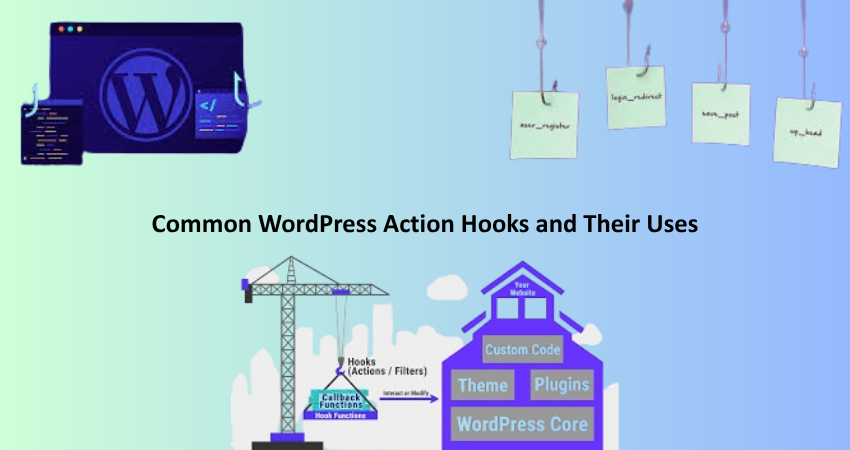
Adds a number of built-in hooks, each serving its purpose, ”The ”init” hook is one of the more flexible ones, firing after WordPress is fully loaded but before headers are sent. It is generally used to register custom post types, taxonomies, and shortcodes. Another crucial hook is ”wp_loaded”, which fires after WordPress itself has been loaded along with all plugins and theme files. This hook is valuable when your task depends on other plugins being loaded. Examples are integrating with third-party APIs and modifying global variables.
The “wp_enqueue_scripts” action provides correct methods for stylesheets and JavaScript files, which ensures compatibility and prevents conflicts. The ”admin_enqueue_scripts” works similarly for the WordPress dashboard. Front-end developers use the ‘wp_head’ and ‘wp_footer’ hooks, respectively, for injecting code into the <head> and just before the closing </body> tag. These hooks are usually used for analytics scripts, custom meta tags, or dynamic CSS. Understanding these core hooks adds to developing efficient and structured WordPress projects.”
Action Hooks for Theme Development
Action hooks provide dynamic capability for WordPress themes instead of hardcoding values into the template files. The after_setup_theme action takes place after activating a theme, so it’s the right hook to enable support for certain features of the theme like thumbnail images, menus, and custom backgrounds. Another very useful hook, widgets_init, allows registering widget areas (sidebars) programmatically. With these hooks, theme programmers could ensure that code runs at the right time and is maintainable for future updates.
Other hooks such as get_header, get_footer, and get_sidebar allow content to be injected before or after these template parts. For example, you might use get_footer to add in a back-to-top button or custom copyright notice. Some themes are also known to have action hooks of their own, as is the case with popular frameworks like Genesis or Astra, which allow their child themes to modify layouts without having to touch any PHP files. Knowing theme-specific action hooks enables developers to build highly customizable and user-friendly WordPress themes.
Creating and Using Custom Action Hooks
Why Create Custom Action Hooks?
Custom action hooks enable extensibility on plugins and themes, permitting other developers to alter functionality without modifying the core functionality. An example would be an e-commerce plugin that implements a hook like after_checkout_complete so that third-party developers can trigger actions after purchase (like sending a thank-you email or updating a CRM system). This architecture honors the open/closed principle whereby your code is open to extension but closed to modification. Thus, it helps to minimize the risk of conflicts and ease updates.
Custom hook development also generates better-organizing code. Instead of cluttering your functions with if-condition checks, you can call the do_action() function and pass over control to other functions or plugins. For example, when a user edits their account, a membership plugin can fire a user_profile_updated hook, letting any add-ons you develop sync this data with external services. This will set a precedent for developing software that goes by the hooks methodology, implying an architecture that exhibits modulatity and is further offering reusability and collaboration in the WordPress ecosystem.
How to Implement Custom Action Hooks
To define your own custom action hook simply invoke the do_action() function followed by its singular hook name, which may also take some optional parameters. Here is an example:
php
do_action(‘custom_after_post_publish’, $post_id, $post);
Similarly, other developers can attach their functions as follows:
php
add_action(‘custom_after_post_publish’, ‘my_custom_function’, 10, 2);
The 10 represents the priority (lower numbers run earlier), and 2 specifies the number of arguments passed. Another option would be to enable the user to remove action dynamically at runtime using remove_action(); you have more control over execution flow. Documented hooks provide other developers understanding of why, what, and how with regard to the intended purpose, parameters, and expected behaviors of custom hooks. Therefore, well documented hooks make your plugins and themes more developer-friendly; hence, widely used and longer sustained in the WordPress community.
Best Practices for Using Action Hooks

Optimizing Performance with Action Hooks
Inefficient usage of action hooks can cause performance bottlenecks. Allowing for a very loose rule, do not create hooks to resource-consuming functions on very high-frequency hooks like wp_loaded and init. Use more specialized hooks like template_redirect for frontend logic or admin_init for backend work. And, always specify the priority and number of accepted arguments in your add_action() calls; this helps avoid unexpected behavior whilst also reducing unnecessary processing.
Another optimization is to deregister hooks that aren’t being used. Plugins usually add multiple actions, some of which can be unnecessary. Emancipate and simplify unnecessary callbacks by removing action. A case would be when a plugin adds a google analytics script at wp_footer and, if you would like to use Google Tag Manager instead, you would probably want to remove that original action so as not to end up with two sets of tracking codes. Profiling your site with such a tool as Query Monitor gives you insight into slow-performing hooks, hence, can help you optimize them performance-wise.
Debugging and Troubleshooting Action Hooks
Troubleshooting the hooked functions can sometimes be really tough, because they invoke at different timings. In order to trace the execution of hooks, one can use the add_action function along with debugging tools such as WP_DEBUG or plugins such as Debug Bar. Alternatively, one could log the activity of hooks using either error_log() or any of the logging plugins. For example:
php
add_action(‘init’, function() {
error_log(‘init hook fired’);
});
Commonly, hook collision is another factor, where more than one function adds its own functionality to the same hook. This can be solved by changing the priorities or using conditional checks in the callback function. If the hook is not executing, check if it is being called via do_action() and if your function is correctly registered with add_action(). Knowledge of the order of execution in WordPress (which is provided in the Codex) helps in identifying the exact locations where the hooks must be placed for maximization in functionality.
Conclusion
In-depth knowledge of WordPress action hooks is part of professional development, allowing developers to extend and customize WordPress completely avoiding core file modification. The guide presented some of the basic concepts of action hooks, such as init and wp_enqueue_scripts, and created custom action hooks for plugins and themes. Using these action hooks enables the construction of modular, maintainable, and high-performance WordPress solutions which will make a really good fit into different other components within the WordPress Ecosystem as well.
On themes, plugins, or sites-as-in-action hooks, they allow the developer extra flexibility to really deepen the coding and functionality within clean, future-proof code. During your year-long experience developing on WordPress, take time to experiment with different hooks for yourself, see how the other world’s top plugins would make use of them, and consciously strive to follow the standards of coding. Over time and constant practice, you would have become very well profiled in effective usage of WordPress action hooks.